RSS

Tuesday, December 25, 2007

backstreet boys-unbreakable


the cool new album from BSB,lo,behold..........here it comes..........
its such a mindblowing album...man,just as always,bsb rocks!!!!!!


1. Everything But Mine
2. Inconsolable
3. Something That I Already Know
4. Helpless When She Smiles
5. Any Other Way
6. One In A Million
7. Panic
8. You Can Let Go
9. Trouble Is
10. Treat Me Right
11. Love Will Keep You Up All Night
12. Unmistakable
13. Unsuspecting Sunday Afternoon

Friday, October 26, 2007

lift-poets of the fall video and the song

hey guys,check out this cool new video,just love it.


and here's the song..........
Get this widget | Track details | eSnips Social DNA

Thursday, October 11, 2007

the all new Inconsolable music video

hey friends,here is the all new bsb inconsolable music video,it rocks!!!!!!!!

Monday, September 3, 2007

HD Photo Plugin For Photoshop Released For Mac OS


Microsoft has released a new version of the HD Photo plugin for Photoshop, one that runs on Mac OS X. If you want to save your photos in the high quality HD Photo (or eventually, JPEG-XR) format, you can now use the plugin in both Windows and the Mac.

The Mac plugin is new, and the Windows XP/Vista plugin has been updated, with a redesigned encoder options dialog that gives you seperate basic or advanced controls, as well as a completely redesigned codec that significantly improves performance on larger images, a fixed tiling option, other bug fixes, and a new setup program. The Mac version is identical to the newer Windows version, and it adds support for HD Photo to Finder, including image thumbnails.

Get the Windows version of the plugin here and the plugin for PPC and Intel Macs here.

apple safari-not going too good


Apple released Safari for Windows a few months ago, and it looks like they maybe should have waited a little longer.

Let us count the ways:

  • Compiler benchmarked Safari against Internet Explorer 7 and Firefox2, and the results didn’t look great for the Apple browser. Safari wound up in last place opening a message in Gmail, last place logging into Gmail, and two seconds slower than Firefox in Google Calendar.
  • If you didn’t like Safari’s blurry fonts, you’ll hate when it spits out gobbledygook because you have different language settings than English. Take a look at the messed up screenshot Amit Agarwal took, and fixing the damn thing isn’t fun or sometimes easy.
  • Apple released the first patch for Safari, upping it to version 3.0.1, fixing security vulnerabilities that have already popped up in the browser.
  • Apple put out a press release, proclaiming 1 million downloads in the first two days. Considering the millions following the WWDC, the AP coverage, the blog posts, news articles in every publication on the planet, one million could be a little low. I’m shocked Apple would brag about downloads so soon, when there may not be a lot of pickup in the weeks and months to come. Typically, these sort of things get a ton of downloads in the first day or two, then taper off unless they are a hit. Nothing we’ve heard indicates Safari is taking off with users, so maybe Apple should have curbed its enthusiasm. Claim 1 million in two days, and if you can’t claim 8 million in a month, you’ve wasted everyone’s time. Does anything indicate that will actually happen?

It’s not all bad. Scott Hanselman’s speed test was on video, and Safari took or tied five out of six tests:

Windows Media Player Finally Supports Firefox

Yeah, it may seem even silly, but until this week, there was no official, sanctioned means of playing Windows Media Player files in Firefox. As a result, if a webpage embedded WMV or another supported format, you’d have to install a third-party plugin (which is never fun, or all that safe). Finally, Microsoft has released an official plugin, as part of their initiative to be a company that plays better. Microsoft’s Open Source Software Lab created the plugin, and you can download it here.

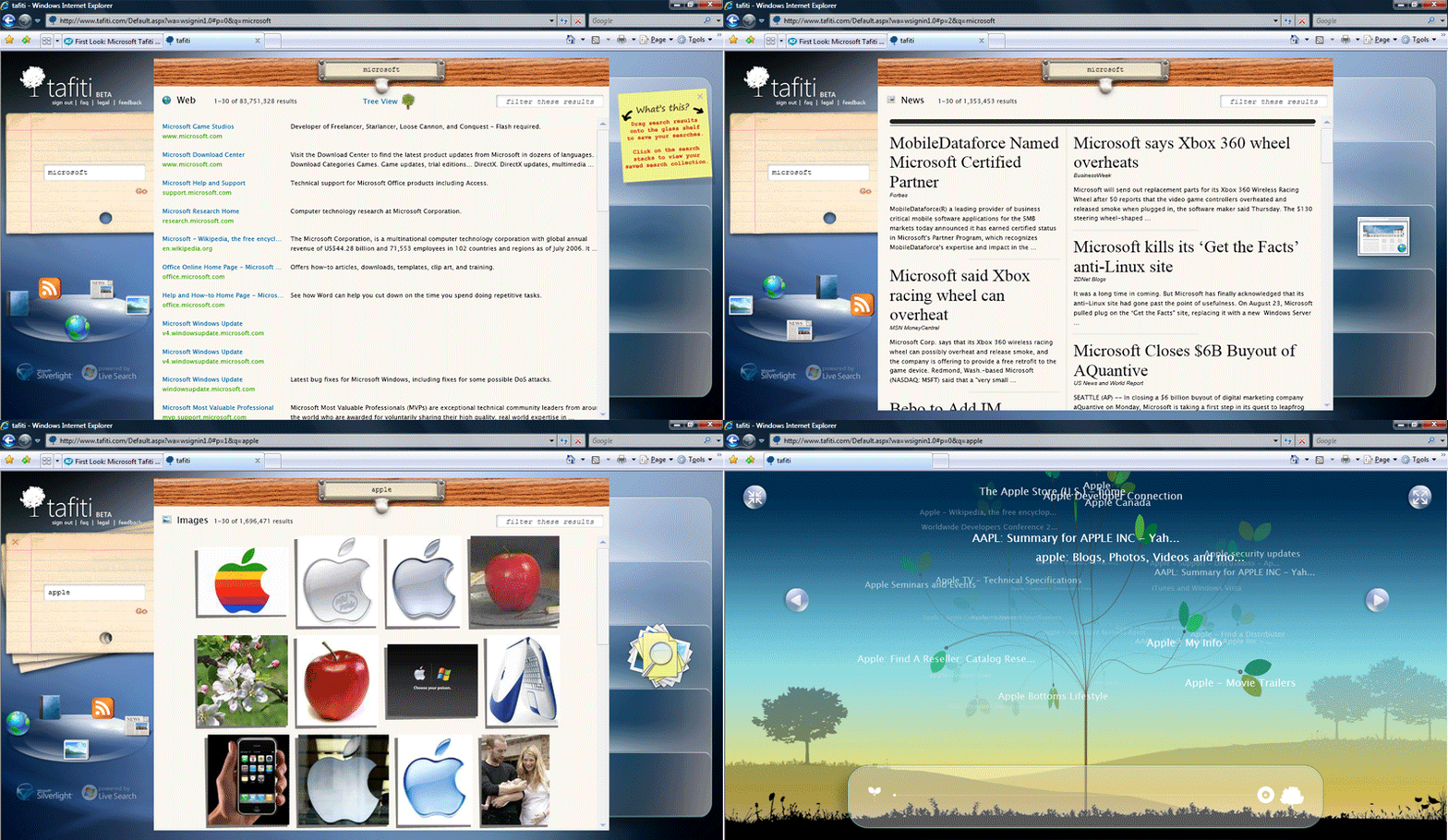
Microsoft has launched a new website, Tafiti.com, that delivers Windows Live Search in a Silverlight interface. Tafiti, swahili for “do research” or “to search”, is more of an expirement, showing the cool applications and UI that are possible with Silverlight, but it is fully functional, with Live Search, including web search, books search, blog search, news search, and image search. It appears that you have to uninstall the Silverlight 1.1 alpha and re-install the 1.0 Release Candidate to make it run (that’s not getting annoying).

You can drag searches over to the areas on the right side, then, share them with others or your other PCs (or Macs). Each search stacks on a card above the last one. Tafiti uses some pretty cool animation, only possible with Silverlight. There’s a really cool carousel that rotates among search types. The news search uses a very cool newspaper style view.

There’s also this cool tree view, that shows items from the search on a rotating tree. It’s good for a screensaver, and can be clicked to run full screen.

On10 has a video demo of the website.

Check out Tafiti, it’s pretty cool, and it goes to show you what Silverlight is capable of. Five guys built this, so the possibilities are more than there for small teams to do cool things.

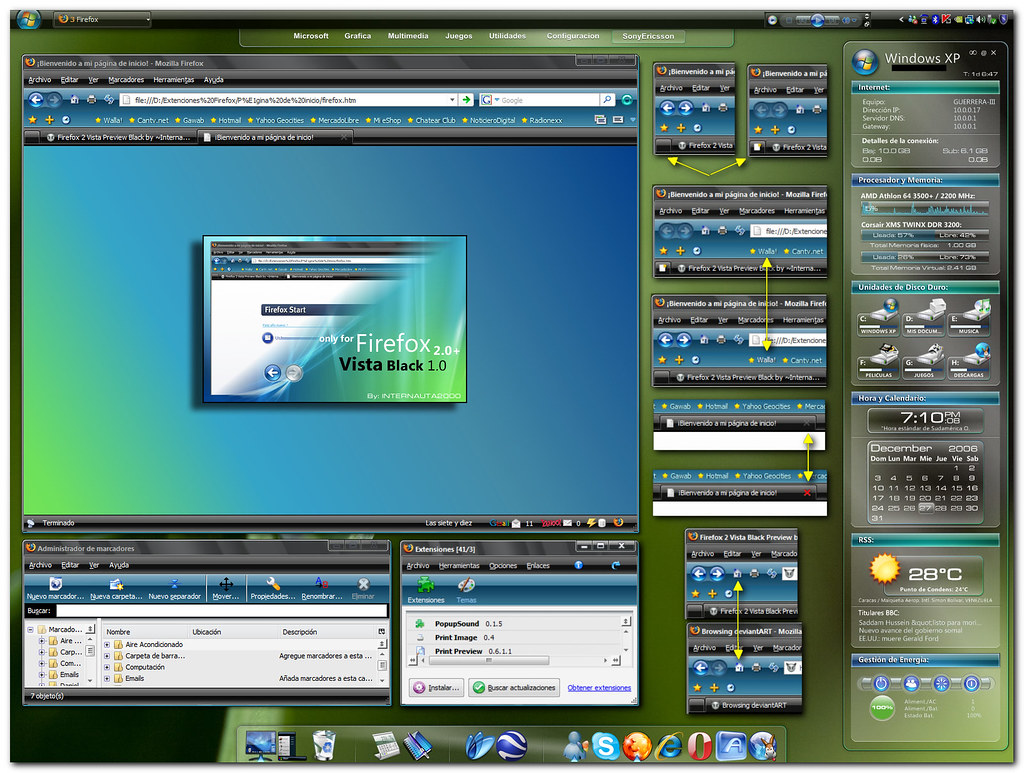
windows vista theme for firefox


take a look at this new windows vista inspired theme for firefox,i use it and i simply love it..........

Saturday, September 1, 2007

BSB'S new album

its so cool to know that bsb is releasing their new album named unbreakable
wow,i just cant wait for the album
i guess it contains songs like helpless when she smiles,inconsolable,any other way,happily never after etc,
anyway,lets wait and see........
http://en.wikipedia.org/wiki/Unbreakable_%28Backstreet_Boys_album%29

thats it for now
this is what wikipedia says:

In a recent INROCK interview, Brian Littrell said the Backstreet Boys newest album will include various music styles, combining their earlier late-90's sound with their most recent guitar driven pop/rock sound.[citation needed] The only confirmed producers are Dan Muckula who produced their 2005 hit single "Incomplete," and producer Rob Weiss.[citation needed]

According to mtv.com: The Backstreet Boys have set an October 31st release date for their as-yet-untitled sixth album, according to a spokesperson.[citation needed] The group's follow-up to 2005's Never Gone will be the first effort since the departure of longtime member Kevin Richardson last summer.

JoJo from 102.7 KIIS-FM in Los Angeles posted a new ballad called "Happily Never After" on www.jojoontheradio.com on May 8th, 2007.[citation needed] It's available for streaming on that website.[citation needed] It had been hand-delivered to him by Backstreet Boys' manager, Johnny Wright, the day before.[citation needed] It is now expected that the song will be on an album by another artist. The chances that it will remain on this one are very slim.[citation needed]

"Helpless When She Smiles", a cover of Bastiaan Ragas' rock ballad, was also leaked online on May 9th.[citation needed] It was to be the first single (said by Brian) but when found that it was sung by another artist, was withheld.[citation needed]

"Any Other Way", an uptempo pop/rock song from the Backstreet Boys upcoming record was leaked to music rating sites at the end of May.[citation needed] The song was produced by Dan Muckula, who wrote and produced their 2005 hit single "Incomplete."[citation needed] It was written by Dan Muckala, Jess Cates, and Lindy Robbins. On July 25th, the first single was confirmed as "Inconsolable".[1]

In a recent article and video with A.J., it was said the Kevin would come back to work on the next album.[2] This is not to be confused with this album which Kevin has no part in.

According to Billboard, the first BSB single from the new album will be Inconsolable which will hit the U.S radio stations on 27th August, 2007.
The first single is a piano-heavy rock ballad, piece produced by Emanuel Kiriakou, and co-written by Lindy Robbins and Jess Cates.[citation needed] It debuted on August 6th, 2007 on New York Music Station Z100.[citation needed]

On August 13th, Brian and AJ had confirmed that the album title is "Unbreakable".[3] Before this announcement, rumored titles were "End To Beginning," "Motivation," and "Picking Up The Pieces".[citation needed]


On a recent interview Nick told that JC Chasez - former NSYNC - wrote an uptempo song with AJ for the 'Backstreet Boys' 'new album'. The title is 'Treat Me Right'. It's not confirmed this song will make the album though.


its been a long time.........

its indeed been a long time since i last blogged
i had been a bit too busy with all my work.........
studies,practice and stuff
we had our assembly programme on friday and it was damn cool.
back to studies as for now,sad.

Friday, July 20, 2007

PHP


What can PHP do?

Anything. PHP is mainly focused on server-side scripting, so you can do anything any other CGI program can do, such as collect form data, generate dynamic page content, or send and receive cookies. But PHP can do much more.

There are three main areas where PHP scripts are used.

  • Server-side scripting. This is the most traditional and main target field for PHP. You need three things to make this work. The PHP parser (CGI or server module), a web server and a web browser. You need to run the web server, with a connected PHP installation. You can access the PHP program output with a web browser, viewing the PHP page through the server. All these can run on your home machine if you are just experimenting with PHP programming. See the installation instructions section for more information.
  • Command line scripting. You can make a PHP script to run it without any server or browser. You only need the PHP parser to use it this way. This type of usage is ideal for scripts regularly executed using cron (on *nix or Linux) or Task Scheduler (on Windows). These scripts can also be used for simple text processing tasks. See the section about Command line usage of PHP for more information.
  • Writing desktop applications. PHP is probably not the very best language to create a desktop application with a graphical user interface, but if you know PHP very well, and would like to use some advanced PHP features in your client-side applications you can also use PHP-GTK to write such programs. You also have the ability to write cross-platform applications this way. PHP-GTK is an extension to PHP, not available in the main distribution. If you are interested in PHP-GTK, visit » its own website.

PHP can be used on all major operating systems, including Linux, many Unix variants (including HP-UX, Solaris and OpenBSD), Microsoft Windows, Mac OS X, RISC OS, and probably others. PHP has also support for most of the web servers today. This includes Apache, Microsoft Internet Information Server, Personal Web Server, Netscape and iPlanet servers, Oreilly Website Pro server, Caudium, Xitami, OmniHTTPd, and many others. For the majority of the servers PHP has a module, for the others supporting the CGI standard, PHP can work as a CGI processor.

So with PHP, you have the freedom of choosing an operating system and a web server. Furthermore, you also have the choice of using procedural programming or object oriented programming, or a mixture of them. Although not every standard OOP feature is implemented in PHP 4, many code libraries and large applications (including the PEAR library) are written only using OOP code. PHP 5 fixes the OOP related weaknesses of PHP 4, and introduces a complete object model.

With PHP you are not limited to output HTML. PHP's abilities includes outputting images, PDF files and even Flash movies (using libswf and Ming) generated on the fly. You can also output easily any text, such as XHTML and any other XML file. PHP can autogenerate these files, and save them in the file system, instead of printing it out, forming a server-side cache for your dynamic content.

One of the strongest and most significant features in PHP is its support for a wide range of databases. Writing a database-enabled web page is incredibly simple. The following databases are currently supported:

Adabas DInterBasePostgreSQL
dBaseFrontBaseSQLite
EmpressmSQLSolid
FilePro (read-only)Direct MS-SQLSybase
HyperwaveMySQLVelocis
IBM DB2ODBCUnix dbm
InformixOracle (OCI7 and OCI8)
IngresOvrimos


We also have a database abstraction extension (named PDO) allowing you to transparently use any database supported by that extension. Additionally PHP supports ODBC, the Open Database Connection standard, so you can connect to any other database supporting this world standard.

PHP also has support for talking to other services using protocols such as LDAP, IMAP, SNMP, NNTP, POP3, HTTP, COM (on Windows) and countless others. You can also open raw network sockets and interact using any other protocol. PHP has support for the WDDX complex data exchange between virtually all Web programming languages. Talking about interconnection, PHP has support for instantiation of Java objects and using them transparently as PHP objects. You can also use our CORBA extension to access remote objects.

PHP has extremely useful text processing features, from the POSIX Extended or Perl regular expressions to parsing XML documents. For parsing and accessing XML documents, PHP 4 supports the SAX and DOM standards, and you can also use the XSLT extension to transform XML documents. PHP 5 standardizes all the XML extensions on the solid base of libxml2 and extends the feature set adding SimpleXML and XMLReader support.

At last but not least, we have many other interesting extensions, the mnoGoSearch search engine functions, the IRC Gateway functions, many compression utilities (gzip, bz2, zip), calendar conversion, translation...


Basic PHP Syntax

A PHP scripting block always starts with and ends with ?>. A PHP scripting block can be placed anywhere in the document.

On servers with shorthand support enabled you can start a scripting block with .

However, for maximum compatibility, we recommend that you use the standard form (

 
?>

A PHP file normally contains HTML tags, just like an HTML file, and some PHP scripting code.

Below, we have an example of a simple PHP script which sends the text "Hello World" to the browser:


Each code line in PHP must end with a semicolon. The semicolon is a separator and is used to distinguish one set of instructions from another.

There are two basic statements to output text with PHP: echo and print. In the example above we have used the echo statement to output the text "Hello World".


Comments in PHP

In PHP, we use // to make a single-line comment or /* and */ to make a large comment block.


PHP DOWNLOAD

PHP 5.2.3

Complete Source Code

Windows Binaries

Monday, July 16, 2007

Windows Vista Business Features

Getting it done just got easier

Find information easily. Instant Search helps you locate information on your PC—even within e-mail. Also, use the save functionality in the new Search Folders feature to run your favorite searches with a single click.

Search Folders

Search folders help you save search criteria to use again.

Improved Explorers help you organize things your way. You can organize your content based on file properties, such as "tags," so you can easily find them later—no matter where you've saved them on your PC.

You can more conveniently share your work with co-workers on your network. With a simple file-sharing tool, you can choose just the people with whom you want to share files.

Enhanced Windows Fax and Scan provides flexible, integrated faxing and scanning in one location on your PC.

Work in a more simple and intuitive way. With the Windows Aero user experience, which includes glass-like visuals, you can easily navigate open files and programs.

Aero user interface

Aero helps you quickly locate the window you need.

Get the most from digital images and video. Easy-to-use tools within Windows Photo Gallery help you retrieve, view, and edit photos for your business or website—without costly outsourcing.

Built-in peace of mind

Use Windows Complete PC Backup and Restore to back up critical documents, files, system files, and programs—everything on your hard disk drives—to the device of your choice.

Backup and Restore Center

The Backup and Restore Center makes protecting and recovering information easier.

Shadow copy automatically archives previous versions of your files. Should you accidentally save a change to a document, or should a document become corrupted, you can easily recover by restoring a previous version of the document.

Encrypting File System helps protect sensitive information and data from being shared outside of your company by enabling you to password-protect shared documents.

Help protect your PCs before they're infiltrated. Windows Defender detects, cleans, and blocks spyware and other unwanted software.

Windows Defender

The automatic protection of Windows Defender helps you avoid unwanted software.

Better protect your PCs. Allow most users to run as standard users with User Account Control.

Provide the critical first line of defense. A smarter, more easily configured, and automatically running Windows Firewall helps protect you against many types of malicious software.

Help keep your PCs up to date with a genuine, licensed copy of Windows Vista Business that will provide you with automatic updates throughout the life of your PC through the enhanced Windows Update feature.

Ready to grow when you are

Get new PCs up and running right away. Quickly transfer data and settings from your old PCs to newly purchased PCs running Windows Vista, with the help of Windows Easy Transfer.

Windows Easy Transfer

Make the move to your new PC fast with Windows Easy Transfer.

Spend less time managing your PCs. User Account Control and enhanced Group Policy capabilities allow you to simplify network administration tasks so you can better protect, update, and maintain your company's PCs.

Manage your network easily. Use Network Center to visually check the connection status of PCs and devices, and troubleshoot connection problems from a single interface and without additional IT support.

Windows Vista Business is ready to grow when you are, supporting connectivity with servers and domains in multiple PC environments.

Your workplace unplugged

Conduct business when and where it's convenient. Use Remote Desktop Connection to access your PC remotely, whether across your company network or through the Internet from your home PC.

Keep your information in sync. With Sync Center, you can synchronize PDAs, mobile phones, and other devices all from one place.

Manage mobile settings with ease. With Windows Mobility Center, you can quickly adjust wireless status, display and presentation settings, and power options for maximizing battery life—all from one easy-to-find location.

Windows Mobility Center

Moving around? The Windows Mobility center gives you a single place to adjust settings for your laptop and other mobile devices.

Collaborate with others by using Windows Meeting Space to create ad hoc wireless networks when you're meeting with colleagues or customers.

Windows Meeting Space

Quickly, and wirelessly, work with other people using Windows Meeting Space.

The Network Center helps you recognize and automatically connect to wireless networks and network devices, such as displays and projectors.

Enjoy Tablet PC enhancements that include better pen navigation and the new touch screen experience that lets you control, navigate, and enter information with your fingers.

Windows Vista Ultimate Features

Everything you need to work more easily and effectively

Windows Aero offers an elegant, more visually compelling desktop experience, giving you a greater ability to visualize and work with your information and a smoother, more stable desktop experience.

Instant Search helps you find whatever you need quickly and easily, whether it's on your PC, on your network, or on the Internet—or even within your e-mail.

With Complete PC Backup and Restore, you can not only back up your personal documents and files, you can also back up all of your operating system files and programs—everything on your hard disk drive. In the event of a catastrophic hardware failure, you can use Complete PC Backup and Restore to get your entire PC back to normal in one easy step.

Backup and Restore Center

You know you need backups. Now This essential maintenance step is much easier with the Backup and Restore Center.

Windows Vista Ultimate also enables you to easily recover previous versions of files and documents that have been accidentally changed. Shadow copy automatically archives previous versions of your files—should you accidentally save a change to a document, or should a document become corrupted, you can easily recover by restoring any previous version of that file.

With new self-healing technologies, Windows Vista Ultimate can automatically identify and fix problems as they occur—helping keep disruptions to a minimum.

Windows Vista Ultimate is available in 35 languages—simultaneously. If you have a multilingual household or are learning a new language, you can install as many languages as you want and even switch between them as easily as logging off and back on again. In addition, if your family shares a single PC, each family member can use his or her preferred language to interact with the PC.

Enhanced Windows Fax and Scan provides flexible, integrated faxing and scanning capabilities in one convenient location on your PC that make it easier to send and receive faxes, scan documents and images, and share those resources with other people. Windows Fax and Scan also helps you get more from your multifunction printing devices.

Windows Fax and Scan

Create, send, and receive faxes, documents, and images from one spot.

Windows SuperFetch helps improve PC responsiveness and helps make system performance more consistent. Windows SuperFetch tracks which applications you use most often and when you use them—and then it preloads those applications into memory to ensure quick access.

For smaller home and business networks, use Network Center to visually check the connection status of PCs and devices, and to troubleshoot connection problems from a single interface and without additional IT support.

Take advantage of all the safety features available in Windows Vista

Windows Defender helps automatically safeguard your PC against pop-ups, slow performance, and security threats caused by spyware and other unwanted software.

Windows Defender

Automatically avoid unwanted software with Windows Defender.

With Parental Controls, you can manage the rules for your children's computer use. You can set time limits for use and also manage their access to the web and to PC games.

With dynamic security protection, Internet Explorer 7 helps you achieve a higher level of security protection than ever before when browsing the web. Internet Explorer 7 includes anti-phishing technology that helps to protect you from fraudulent websites that attempt to steal your personal information.

Internet Explorer Anti-phishing

Anti-phishing technology in Internet Explorer helps protect your personal information

Windows Vista Ultimate also enables you to easily recover previous versions of files and documents that have been accidentally changed. Shadow copy automatically archives previous versions of your files—should you accidentally save a change to a document, or should a document become corrupted, you can easily recover by restoring any previous version of that file.

If you have confidential and valuable information stored on your PC, BitLocker Drive Encryption helps ensure the integrity of that information by encrypting your entire hard drive. Only you have access to that information—even if your PC is lost, stolen, or decommissioned.

Using Standard user accounts, you can confidently allow your children to use your PC, and lessen the risk that they will install malicious software or make harmful changes to the PC.

Provide the critical first line of defense. A smarter, more easily configured, and automatically running Windows Firewall helps protect you against many types of malicious software.

Encrypting File System helps protect sensitive information and data from being shared outside of your company by enabling you to password-protect shared documents.

Windows Vista Ultimate includes support for joining a network domain—a standard business networking feature that enables improved security and manageability for business PCs. Windows Vista Ultimate also includes support for Group Policy. This helps system administrators save time and reduce security risks by configuring wireless network settings, removable storage devices, printers, Internet Explorer, and even power-management settings centrally and automatically. In addition, Windows Vista Ultimate includes the essential IT infrastructure found in Windows Vista Business and Windows Vista Enterprise so that your PCs and IT infrastructure can grow as your business grows and thrives.

Everything you need for a more entertaining experience

Windows Vista Ultimate includes Windows Media Center so that you can enjoy your entire digital entertainment library on your PC or on your television. Use your Media Center remote control or your mouse to view your photos in a cinematic slide show, browse your music collection by cover art, easily play DVDs, or watch and record your favorite TV shows. Media Center even makes it easy to download movies and enjoy them whenever you want.

Windows Media Center

Enjoy all your digital entertainment with the simplicity of Windows Media Center.

Burn your photo slide shows and home movies to a professional-looking video DVD with Windows DVD Maker, and watch them on a standard DVD player or on the PC of your choice.

Take Windows Media Center to the next level and enjoy all of your digital entertainment on TVs throughout your home (not just in the room where your PC resides) with support for Xbox 360 and other consumer electronics connected to your home network.

Windows Photo Gallery, included in Windows Vista Ultimate, offers a better and more flexible way of acquiring, organizing, fixing, sharing, and printing your digital photos and home videos. You can take advantage of keyword "tags," a star rating system, and built-in Instant Search to manage and organize your photos and find them again quickly and easily. Windows Photo Gallery includes the most important photo-editing features, making it quick and easy to crop, fix red eye, and even adjust the exposure and color of your digital photos. Windows Photo Gallery also enables you to play slide shows of your photos and videos together on your PC, choosing from several themes and templates, setting them to music, or even watching them on your TV.

With Windows Vista Ultimate, you can play the latest high-performance PC games with stunning 3-D visuals. From the simple to the spectacular, there are Games for Windows for every age and ability, either on your PC or online. And with DirectX 10 included, only Windows Vista will be able to run the latest, most graphically advanced games in the market.

Windows Vista Ultimate includes updates to your favorite built-in Windows games, such as Solitaire, Spider Solitaire, and FreeCell. Windows Vista Ultimate also includes three new premium games: Mahjong Titans, Chess Titans, and InkBall.

Chess Titans

Windows Vista Ultimate includes three premium games, including Chess Titans.

You can capture, edit, and publish your digital home movies in standard or high-definition format with the updated Windows Movie Maker.

Windows Media Player 11 includes new features that are designed to help you manage your library of digital music, photos, and videos that you have stored on your PC. And you can easily connect to a variety of portable players so that you can take your media collection with you wherever you go.

Take it all with you for the ideal mobile PC

Windows Mobility Center saves you time by enabling you to quickly access and set key mobile system settings from one easy-to-find location. For instance, you can quickly adjust your wireless networking, display, sound, Tablet PC, and presentation settings. You can even adjust power options to maximize your PC's battery life.

Windows Mobility Center

Find all your mobile system settings in one place: The Windows Mobility Center.

If you have confidential and valuable information stored on your mobile PC, Windows BitLocker Drive Encryption helps ensure the integrity of that information by encrypting your entire hard drive. Only you have access to that information—even if your mobile PC is lost or stolen.

Mobile users can connect to wireless networks in the workplace, at home, or in public hotspots—with more confidence, privacy, and ease—with improved wireless networking and support for the most up-to-date wireless security standards.

Windows Vista Ultimate makes using a PC with Windows Tablet and Touch Technology easier and more efficient than ever before with new and improved pen-and-ink functionality, improved navigation, and dramatically improved handwriting recognition. Windows Vista Ultimate even includes built-in support for touch screens.

Tablet PC handwriting

Extensive technical improvements help you get more done, quickly, with a Tablet PC.

Using Remote Desktop, you can access and control your PC remotely. This feature of Windows Vista Ultimate makes it easier to more securely access documents and programs on your computer remotely. You can gain remote access from across your home network, work network, or across the Internet from another computer, enabling you to get work done wherever you have a network connection.

With Sync Center, you can keep other PCs, server shares, shared documents, digital media devices, Smartphones, Pocket PCs, and other devices synchronized with your PC easily and in one convenient place.

If there is a problem with your network connectivity, new Network Diagnostics is designed to help you identify and solve the problem quickly and easily. Most common problems are automatically fixed for you.

Windows Vista Ultimate includes Windows Meeting Space, which helps make face-to-face meetings more productive. Windows Meeting Space enables collaboration and sharing of documents among small groups of Windows Vista users, even when there is no network available.

Windows SideShow is a feature of Windows Vista Ultimate that supports secondary displays for portable computers, making it easier for you to view important information stored on your laptop or to access key controls on other devices, even when your laptop screen is closed or when your PC is turned off.

Windows Vista Home Premium Features

Get things done more easily and intuitively

The spectacular Windows Aero user experience features stunning visual effects, including helpful animations, transparent glass menu bars, and live thumbnail previews of open programs. Your desktop experience never looked this good.

A unique part of the Windows Aero experience is Windows Flip 3D, which enables you to dynamically flip through your open programs in a three-dimensional, stacked view, so that you can quickly locate and select the one that you want.

Windows Flip 3D

Windows Flip 3D shows the beauty and functionality Aero provides.

You can instantly find information on your computer—including documents, e-mails, photos, and even music files—with Instant Search, which is integrated throughout Windows Vista.

Searching for information on the Internet is easier than ever with Internet Explorer 7, which includes web searching right from the browser, with no additional toolbars necessary. Tabbed browsing also enables you to simultaneously browse multiple web pages in one window.

See the information you care about instantly with Windows Sidebar and gadgets, which bring real-time information, like weather and news, directly to your desktop.

Windows Sidebar and Gadgets

Windows Sidebar and gadgets put handy tools right at hand on your desktop.

Flexible organization makes it simple to instantly find and view your files any way that you want.

Relive a lifetime of memories using Windows Photo Gallery. It's now easier to download photos from your digital camera, and then organize, edit, view, and share them with family and friends.

Windows Photo Gallery

Download, find, and share photos easily with Windows Photo Gallery.

Get up and running fast using Windows Easy Transfer to automatically copy your files, photos, music, e-mail, and settings from your old PC to your new Windows Vista-based PC.

Windows Vista works in the background to take care of itself, giving you a better and faster computing experience. Using new performance self-tuning and diagnostics technologies, Windows Vista can improve the responsiveness of the applications you use most often and help to decrease file download times.

Windows SuperFetch also helps to improve the responsiveness and performance of your PC by tracking which applications you use most often and then preloading them into memory for faster access.

Windows Vista includes new self-healing technology that can identify problems and fix them so you can keep system disruptions to a minimum.

Windows Vista contains built-in diagnostics that look for hardware failures, network problems, and slow performance issues so they can be resolved before they affect your productivity.

Windows Vista Home Basic Features

Easily search and find everything on your PC and the Internet

Instantly find information on your computer—including documents, e-mails, photos, and even music files—with Instant Search, which is integrated throughout Windows Vista.

Start Menu with Search

Search anywhere, even from the Start menu.

Searching for information on the Internet is easier than ever with Internet Explorer 7, which includes web searching right from the browser, with no additional toolbars necessary. Tabbed browsing also enables you to simultaneously browse multiple webpages in one window.

Internet Explorer Quick Tabs

See your open browser windows on a single page.

See the information you care about instantly with Windows Sidebar and gadgets, which bring real-time information, like weather and news, directly to your desktop.

Flexible organization features make it simple to instantly find and view your files any way you want.

Relive a lifetime of memories using Windows Photo Gallery. It's now easier to download photos from your digital camera and then organize, edit, view, and share them with family and friends.

Windows Photo Gallery

Quickly view, edit, and share images with Windows Photo Gallery.

Get up and running quickly using Windows Easy Transfer to automatically copy your files, photos, music, e-mail, and settings from your old PC to your new Windows Vista-based PC.

Windows Vista works in the background to take care of itself, giving you a better and faster computing experience. Using new performance self-tuning and diagnostics technologies, Windows Vista can improve the responsiveness of the applications you use most often and help to decrease file download times.

Windows SuperFetch helps make your PC run faster and enables your applications to load faster.

Windows Vista includes new self-healing technology that can identify problems and fix them so you can keep system disruptions to a minimum.

Windows Vista contains built-in diagnostics that look for hardware failures, network problems, and slow performance issues so they can be resolved before they affect your productivity.

Friday, June 8, 2007

linkin park-what i've done-lyrics


WHAT I'VE DONE MUSIC VIDEO

Thursday, May 10, 2007

kool IM-the cool new site


hi friends
this is a cool new site called kool IM
http://www.koolim.com
here,you can log into yahoo messenger,gtalk,AIM messenger
MSN and windows live messenger and ICQ and Jabber too.
cool,isnt it,try it out today itself.
i have also put some pics above for everyone to look at it.

the latest version of yahoo messenger

hi friends,
this is the all new yahoo messenger 8.1,the latest version of messenger.
click right here to download it and enjoy.

Tuesday, May 8, 2007

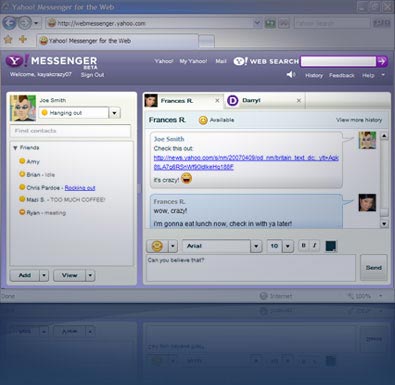
yahoo messenger[chat inside your browser]


hey friends,
have you heard about the latest news on yahoo messenger
well,yahoo has introduced chatting right from your browser instead of downloading it
so friends,
if you have any problems in downloading messenger,dont worry,
just click here to go to the site and chat right through your browser with all your friends.
i have also put a cool pic for the all of you to see.
so,what are you waiting for,go to the site right now and chat with your friends.

opera widgets